How to edit email templates

Follow this steps to edit your email templat

1. Log in to Admin Area2. Go to Configuration click Email Templates

3. Go to Email Templates

        https://sive.host/titfombe/repository//ETPartsersHub.png

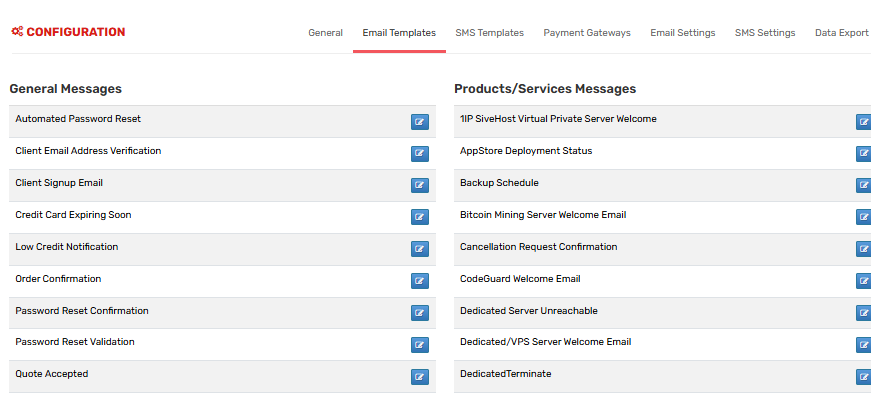
4.  Pick the category

https://sive.host/titfombe/repository/ETConfig.png

On the left you'll see categories:

  • General Messages - System emails like Password Reset
  • Products/Services - Welcome Email, Suspension
  • Support - Ticket Opened, Ticket Reply
  • Domains - Domain Renewal Notice

4. Click "Edit"

https://sive.host/titfombe/repository/ETedit.png

  Find the template you want and click the pencil/edit icon

5. Edit the content

  https://sive.host/titfombe/repository//ETPartsersHub.png

You can edit:

Subject: E.g. Your invoice #{$invoice_id} from {$company_name}

Message: The body of the email. You can use HTML

Merge Fields: These pull client info automatically. Click "Available Merge Fields" 

  • 0 Badirisi ba Bone se se na le Mosola
A karabo e e ne e thusa?

Ditlhogo tse di Amanang

How to Access Partners Hub on the Client Area

As a partner, you will empower you to carefully manage all acquired customers together with...

Partners Hub Products

Product Categories   Group Name: PartnersHub Shared Hosting   Launch...

Getting Started With Your PartnersHub Store

This guide explains what to prepare after your PartnersHub service has been activated and how to...

How to set product prices on the client area

Step 1  -Log in to your client area and direct your self to partners hub. Step 2 -Above your...

How to Add/Create Clients on Partners Hub

How to Add/Create a Client in Partners Hub This article explains how to create a new client...